
In an increasingly connected world, people rely on dozens of online accounts for work, communication, entertainment, banking, and shopping. Managing multiple passwords can quickly become overwhelming, leading many users to reuse passwords or choose weak combinations that are easy to remember. Unfortunately, these habits can create serious security risks. LastPass offers a practical solution by helping users store, organize, and protect their passwords in a secure digital environment.
LastPass is one of the most recognized password management platforms available today. It provides users with a convenient way to manage login credentials while improving online security. Whether you are an individual looking to protect personal accounts or a business aiming to strengthen cybersecurity, LastPass delivers powerful tools designed to simplify password management.
LastPass is a password manager that securely stores login credentials and sensitive information in an encrypted vault. Instead of remembering dozens of unique passwords, users only need to remember one master password that unlocks access to their secure vault.
The platform works across multiple devices and browsers, allowing users to access stored credentials wherever they are. By automating password storage and retrieval, LastPass reduces the stress of managing numerous online accounts while encouraging stronger security practices.
Why Password Management Matters
Passwords are often the first line of defense against unauthorized access to personal and professional information. However, many users continue to make common mistakes that increase their vulnerability to cyber threats.
Some of the most common password related issues include using the same password across multiple websites, creating passwords that are easy to guess, storing credentials in unsecured locations, and failing to update passwords regularly. These habits make it easier for cybercriminals to gain access to accounts and sensitive data.
A password manager like LastPass helps eliminate these risks by encouraging the use of strong and unique passwords for every account.
Key Features of LastPass
The secure vault serves as the central location for storing passwords and sensitive information. Users can organize their credentials efficiently and retrieve them whenever needed.
Advanced encryption protects all stored information, ensuring that only authorized users can access the vault.
Creating strong passwords is essential for online security. LastPass includes a built in password generator that creates complex passwords containing a combination of letters, numbers, and special characters.
These automatically generated passwords are far more secure than common passwords chosen by users.
One of the most popular features of LastPass is its ability to automatically fill login credentials on websites and applications. This saves time and eliminates the need to manually enter usernames and passwords.
Automatic filling also helps users avoid phishing attempts by ensuring credentials are entered only on recognized websites.
Modern users often access their accounts from multiple devices throughout the day. LastPass synchronizes information across smartphones, tablets, laptops, and desktop computers, creating a seamless experience regardless of the device being used.
In addition to passwords, LastPass allows users to store confidential information such as financial details, identification numbers, software licenses, and important documents.
This feature provides a secure alternative to storing sensitive information in unsecured files or notes.
LastPass helps users identify weak, reused, or outdated passwords through password health reports. These reports provide valuable insights into account security and encourage users to improve vulnerable credentials.
Benefits of Using LastPass
Enhanced Security
The primary advantage of LastPass is stronger protection against cyber threats. By generating and storing unique passwords for every account, users significantly reduce the likelihood of successful hacking attempts.
Remembering dozens of passwords can be frustrating. LastPass eliminates this burden by securely storing credentials and automatically filling login forms when needed.
Improved Productivity
Businesses and individuals can save time by reducing password related interruptions. Employees spend less time resetting forgotten passwords and more time focusing on important tasks.
Protection Against Data Breaches
Cybercriminals often exploit weak passwords to gain unauthorized access to accounts. LastPass helps users create stronger credentials and monitor potential security risks, reducing the chances of a successful breach.
Secure Password Sharing
Families and teams often need to share access to certain accounts. LastPass provides secure sharing features that allow users to grant access without exposing actual passwords.
LastPass for Personal Users
Personal users benefit from LastPass by securing social media accounts, email services, banking platforms, streaming subscriptions, and online shopping accounts. The platform simplifies password management while improving overall security.
For individuals who frequently forget passwords or struggle to manage multiple accounts, LastPass offers an efficient and reliable solution. Its user friendly interface makes it accessible even for those with limited technical knowledge.
Organizations face unique challenges when managing employee credentials and protecting sensitive company information. LastPass Business offers advanced features specifically designed for professional environments.
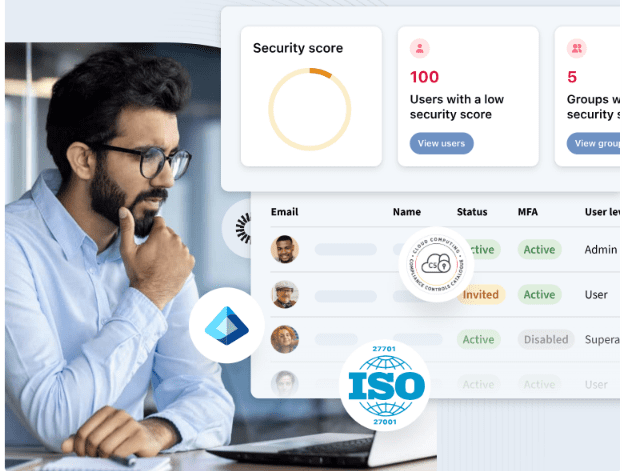
These features include centralized administration, employee account management, access controls, security reporting, and shared password vaults. Business leaders can monitor password practices across teams and enforce security policies that reduce organizational risk.
The platform also supports secure collaboration by enabling controlled password sharing among authorized employees.
The Importance of Multi Factor Authentication
While strong passwords provide a solid foundation for security, additional protection is often necessary. LastPass supports multi factor authentication, which requires users to verify their identity through a second authentication method.
Examples include authentication applications, biometric verification, security keys, and temporary verification codes.
This additional security layer makes it significantly more difficult for unauthorized users to gain access to accounts, even if a password is compromised.
Privacy is a major concern for anyone storing sensitive information online. LastPass uses a zero knowledge security model, meaning the company cannot access or view user data stored within the vault.
All encryption takes place locally on the user device before information is transmitted or stored. This approach ensures that users maintain complete control over their passwords and confidential information.
Best Practices for Using LastPass
To maximize security and effectiveness, users should follow several important practices.
Create a strong master password that is difficult to guess
Enable multi factor authentication whenever possible
Review password health reports regularly
Replace weak or compromised passwords immediately
Use generated passwords instead of creating your own
Store sensitive information securely within the vault
Monitor security alerts and notifications
These habits help strengthen overall cybersecurity and minimize potential vulnerabilities.
The Future of Password Security
As technology evolves, cybersecurity threats continue to become more sophisticated. Password management solutions are playing an increasingly important role in protecting digital identities.
LastPass continues to innovate by developing new security features, identity protection tools, and authentication technologies. The future may include greater adoption of passwordless authentication methods, but secure credential management will remain essential for years to come.
Organizations and individuals alike are recognizing the importance of investing in tools that simplify security while reducing risk.
LastPass has become a trusted solution for password management by combining security, convenience, and ease of use. Its comprehensive features help users create stronger passwords, organize sensitive information, and protect their digital identities from growing cyber threats.
Whether you are managing personal accounts or securing an entire business, LastPass provides the tools needed to improve online security and simplify daily digital activities. By adopting strong password practices and utilizing the capabilities of LastPass, users can enjoy greater confidence and peace of mind in an increasingly connected world.