
Introduction to Planner 5D and the Future of Home Design
Designing a dream home no longer requires years of technical training or expensive architectural software. With the rise of intuitive digital platforms, anyone can transform ideas into realistic interior and exterior designs from the comfort of their own space. One of the most powerful tools leading this transformation is Planner 5D. Whether you are redesigning a single room, planning a full renovation, or building a house from scratch, Planner 5D offers a complete solution that bridges imagination and execution.
Planner 5D is a user friendly home design platform that allows individuals to create detailed floor plans and immersive interior layouts in both two dimensional and three dimensional formats. It is designed for beginners, homeowners, students, and professionals who want flexibility without complexity. The platform works seamlessly across devices, including desktop, tablet, and mobile, which makes it accessible at every stage of the design process.
What makes Planner 5D stand out is its balance between simplicity and depth. You can start with a blank canvas or choose from pre designed templates. Walls, doors, windows, and structural elements can be placed with precision. Once the structure is ready, the interior design process becomes an exciting journey of customization, creativity, and visualization. The software provides an extensive catalog of furniture, decor, appliances, materials, and textures that can be dragged and dropped into your layout.
In today’s world, visualization plays a major role in decision making. Before purchasing furniture or committing to renovation costs, homeowners want clarity. Planner 5D enables realistic 3D rendering that allows you to virtually walk through your future home. This level of visualization reduces costly mistakes and enhances confidence in design choices. From lighting conditions to color coordination, everything can be tested digitally before implementation.
The platform also integrates smart features such as automatic room recognition and AI assisted layout suggestions. These features save time and provide inspiration, especially for users who feel overwhelmed at the beginning. Instead of staring at an empty layout wondering where to start, you can rely on guided tools that streamline the process.
This guide will walk you step by step through the entire journey of designing your dream home using Planner 5D. From setting up your first project to refining final details, you will learn how to maximize every feature and transform your ideas into a visually stunning reality.
Getting Started with Your First Project
The first step in using Planner 5D effectively is understanding how to begin a project with clarity and direction. When you open the platform, you are presented with the option to create a new design. At this stage, you can either start from scratch or choose a template that closely matches your intended layout. Beginners often find templates helpful because they provide a structural starting point that can be modified.
If you choose to start from scratch, the process begins with drawing walls. Walls define the foundation of your space, so accuracy is important. Planner 5D allows you to set precise measurements, ensuring your digital design mirrors real world dimensions. You can adjust wall thickness, length, and angles to replicate existing floor plans or create entirely new ones. Adding doors and windows is just as simple, with adjustable sizes and styles to match your vision.
After establishing the structural layout, the next step is defining rooms. Each enclosed area can be labeled as a living room, bedroom, kitchen, bathroom, or any custom category. This classification helps organize your design and makes future editing easier. Planner 5D also provides suggested layouts once rooms are identified, which can inspire furniture placement and traffic flow.
Switching between 2D and 3D views is an essential feature during this stage. The 2D mode helps you focus on spatial accuracy and measurements. The 3D mode, on the other hand, allows you to visualize how the space feels. You can rotate the camera, zoom in, and examine corners to ensure proportions look realistic. Moving between these modes frequently helps maintain balance between functionality and aesthetics.
Lighting is another critical component when setting up your initial layout. Planner 5D enables you to simulate natural light by adjusting window placement and orientation. You can also experiment with artificial lighting fixtures to understand how brightness affects the mood of the space. Lighting influences color perception, so testing it early prevents design mismatches later.
Saving your progress regularly ensures your ideas are secure. Planner 5D automatically syncs projects to your account, allowing you to access them from multiple devices. This flexibility is especially useful if inspiration strikes while you are away from your primary workspace.
Starting your first project may feel overwhelming, but focusing on structure first and details later keeps the process manageable. Once the foundation is in place, the creative phase becomes far more enjoyable.
Designing Interiors with Precision and Creativity
Once your floor plan is complete, the most exciting phase begins: interior design. This is where your dream home starts to take personality. Planner 5D offers an extensive catalog filled with furniture pieces, decorative items, appliances, and finishing materials. The key to effective interior design is balancing creativity with practicality.
Begin by selecting major furniture pieces for each room. In a living room, this may include sofas, coffee tables, television units, and shelving systems. In a bedroom, focus on the bed, wardrobes, and side tables. The platform allows you to drag and drop items directly into the layout. Each object can be resized, rotated, and repositioned to achieve the perfect arrangement.
Spacing plays a crucial role in interior design. Ensure there is enough room for comfortable movement between furniture pieces. Planner 5D makes it easy to measure distances, helping you avoid overcrowded layouts. Think about how people will walk through the room and interact with the environment. Functional flow should always complement visual appeal.
Color selection significantly impacts the overall atmosphere of your home. Planner 5D provides a wide range of wall colors, wallpapers, flooring textures, and material finishes. Experimenting with different palettes can transform a room from minimal and modern to warm and traditional. Try neutral tones for a timeless look or bold accent walls for a dramatic statement.
Textures add depth and realism to your design. Wood finishes, marble countertops, fabric upholstery, and metallic accents can be applied to surfaces with a few clicks. Combining different textures creates contrast and visual interest. For example, pairing soft textiles with sleek glass or metal surfaces results in a balanced aesthetic.
Decor elements such as artwork, plants, rugs, and lighting fixtures bring character to your design. While furniture defines structure, decor defines personality. Avoid overcrowding spaces with excessive decoration. Instead, choose meaningful pieces that enhance the theme of each room.
Planner 5D also allows you to customize ceiling height and add architectural features such as columns, staircases, and partitions. These elements elevate your design from basic to sophisticated. If you are working on a multi level home, the platform supports multiple floors, enabling seamless transitions between stories.
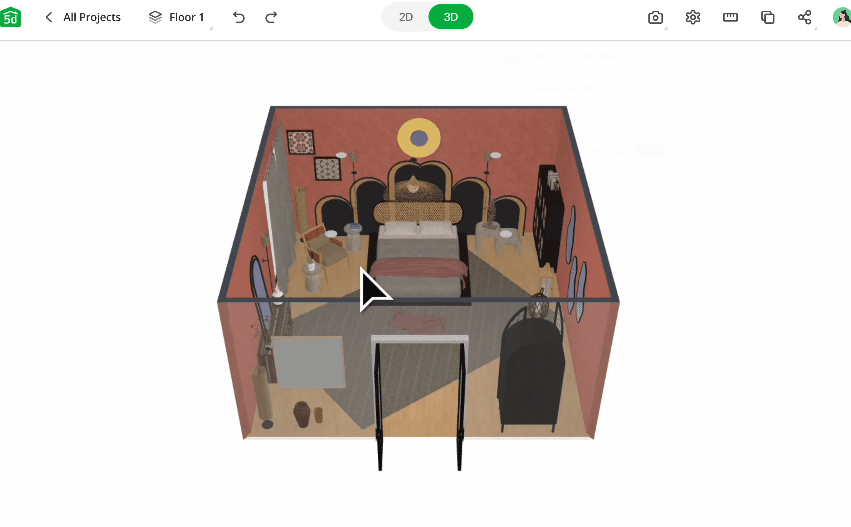
The ability to preview your interior design in high quality 3D rendering is one of the most powerful aspects of Planner 5D. Realistic shadows, reflections, and lighting effects provide an almost photographic preview of your space. This visualization helps you evaluate whether the design truly matches your expectations.
Designing interiors requires patience and experimentation. Do not hesitate to test multiple layouts and color schemes. The digital environment allows unlimited adjustments without financial risk. This freedom encourages creativity and ensures your final design reflects your authentic vision.
Advanced Features and Smart Tools for Professional Results
As you become more comfortable with the basics, exploring advanced features unlocks the full potential of Planner 5D. These tools elevate your design from simple layouts to professional grade presentations.
One of the standout features is the AI assisted design option. By analyzing your room type and dimensions, the platform can suggest optimized furniture arrangements. This is especially helpful for users who struggle with spatial planning. While suggestions can be modified, they provide a valuable starting point that saves time.
Another advanced feature is realistic rendering. High quality renders simulate natural light, artificial lighting, shadows, and material reflections with impressive accuracy. These renders are ideal for presenting ideas to family members, clients, or contractors. A clear visual representation reduces misunderstandings and aligns expectations.
Planner 5D also includes a snapshot function that captures specific camera angles. You can create multiple perspectives of a single room, showcasing different design highlights. This feature is beneficial when comparing design variations or building a presentation portfolio.
Customizing materials goes beyond simple color changes. You can adjust glossiness, transparency, and texture scale to achieve precise finishes. For example, glossy tiles will reflect light differently than matte surfaces. Understanding these subtle differences enhances realism.
If you are planning renovations, measurement accuracy becomes essential. Planner 5D allows you to input exact dimensions for walls, windows, and furniture. This precision ensures that the design can realistically be implemented in the physical space. Many users replicate their existing homes to experiment with renovation ideas before making actual structural changes.
Collaboration features enable multiple users to work on the same project. Sharing access with family members or colleagues encourages feedback and collective decision making. Instead of explaining your ideas verbally, you can demonstrate them visually within the platform.
The software also supports exporting projects in various formats. Whether you need images for social media, design proposals, or construction references, exporting options provide flexibility. High resolution outputs ensure your work maintains quality across different platforms.
Exploring these advanced tools transforms Planner 5D from a simple home design app into a comprehensive architectural visualization solution. By combining creativity with technical precision, you can produce results that rival professional designers.
Bringing Your Dream Home to Life with Confidence
Designing a dream home is not only about aesthetics but also about emotional connection. Planner 5D empowers users to move from abstract ideas to tangible visual experiences. By following a structured approach, you can confidently translate imagination into reality.
Start by defining your vision clearly. Consider lifestyle needs, family size, storage requirements, and long term plans. Your dream home should reflect how you live daily. Planner 5D helps align design choices with practical functionality. For example, an open concept layout may suit social households, while separate rooms provide privacy and quiet.
Consistency across spaces creates harmony. Choose a cohesive color palette and material theme that flows from one room to another. While each space can have its unique character, maintaining a unifying style ensures visual balance. Planner 5D allows you to copy design elements across rooms to maintain consistency effortlessly.
Budget considerations are easier to manage when you have a clear digital plan. By visualizing furniture placement and material choices beforehand, you reduce impulse purchases and costly mistakes. The platform acts as a planning tool that supports smarter financial decisions.
Before finalizing your design, review every detail in 3D mode. Walk through the virtual environment slowly. Examine corners, lighting angles, and furniture alignment. Imagine daily activities within the space. This mental simulation helps identify overlooked adjustments.
Confidence grows when you see your ideas fully realized on screen. The ability to refine details without physical labor eliminates fear of experimentation. You can test bold color schemes, unconventional layouts, or modern concepts without commitment. If something does not work, adjustments are immediate.
Planner 5D also serves as a long term design companion. Even after completing your dream home layout, you can return to the project to experiment with seasonal decor, furniture upgrades, or renovation ideas. The flexibility of digital design ensures your home evolves alongside your lifestyle.
Ultimately, the power of Planner 5D lies in its accessibility. You do not need advanced technical skills to create stunning designs. Step by step, room by room, you can build a home that reflects your personality, values, and aspirations. With patience, creativity, and thoughtful planning, your dream home becomes more than an idea. It becomes a carefully crafted vision ready to be transformed into reality.