
In today’s digital world, managing passwords has become one of the biggest challenges for internet users. From social media accounts and online banking to business applications and shopping websites, people are required to remember dozens of login credentials. Using the same password across multiple accounts may seem convenient, but it significantly increases security risks. This is where LastPass comes in as a powerful and reliable password management solution.
LastPass helps individuals and businesses securely store, organize, and manage passwords while improving online security. With advanced encryption technology, convenient password generation tools, and seamless device synchronization, LastPass has become one of the most trusted password managers available today.
What Is LastPass
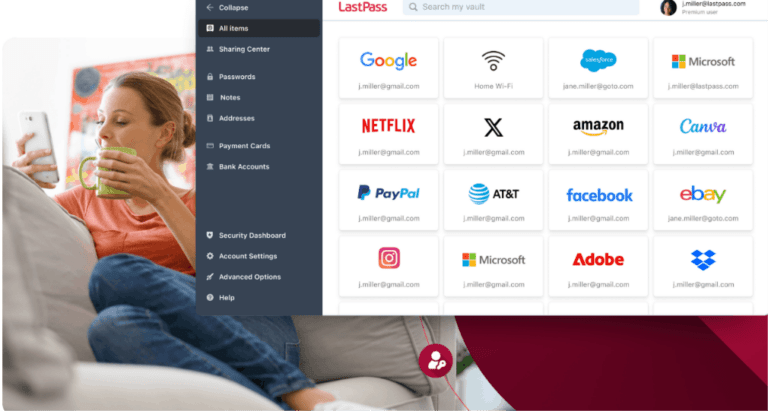
LastPass is a cloud-based password management service designed to help users securely store passwords and sensitive information in a digital vault. Instead of remembering multiple passwords, users only need to remember one master password to access all their stored credentials.
The platform automatically saves login information, fills passwords on websites, and generates strong passwords for new accounts. This reduces the risk of weak passwords and helps users maintain better cybersecurity practices.
Whether you are an individual managing personal accounts or a business protecting company data, LastPass offers solutions that simplify password management while enhancing security.
Why Password Security Matters
Cybercrime continues to grow every year, and weak passwords remain one of the leading causes of security breaches. Many users still rely on simple passwords that can be easily guessed or cracked by attackers.
Poor password habits often include:
Using the same password across multiple accounts
Creating short and predictable passwords
Writing passwords on paper or unsecured notes
Sharing passwords through email or messaging apps
Failing to update passwords regularly
When a single password is compromised, attackers may gain access to multiple accounts if the same credentials are used elsewhere. LastPass addresses these issues by helping users create unique and complex passwords for every account.
Key Features of LastPass
Secure Password Vault
The password vault serves as the central hub for storing all login credentials. Users can organize passwords into categories and access them whenever needed.
The vault is protected by strong encryption technology, ensuring that only the account owner can view stored information.
Password Generation
Creating strong passwords manually can be difficult. LastPass includes a password generator that automatically creates secure passwords containing combinations of letters, numbers, and special characters.
These passwords are significantly more difficult for hackers to crack than commonly used passwords.
Autofill Functionality
One of the most convenient features of LastPass is automatic form filling. The software can instantly fill usernames and passwords when users visit saved websites.
This saves time while reducing the risk of entering credentials on fraudulent websites.
Multi Device Access
Modern users frequently switch between smartphones, tablets, laptops, and desktop computers. LastPass synchronizes passwords across devices, allowing users to access their information wherever they are.
This seamless experience improves productivity and convenience.
Secure Notes Storage
Beyond passwords, LastPass allows users to store important information such as:
Credit card details
Passport information
Software licenses
Insurance documents
Personal notes
All stored information benefits from the same level of encryption and protection.
Dark Web Monitoring
Many premium plans include dark web monitoring services. This feature scans databases of compromised accounts and alerts users if their information appears in a known data breach.
Early warnings enable users to change passwords before significant damage occurs.
Benefits of Using LastPass
Improved Security
The primary advantage of LastPass is stronger security. Users can generate unique passwords for every account without worrying about memorizing them.
This greatly reduces the likelihood of unauthorized access.
Increased Convenience
Remembering dozens of passwords is frustrating. LastPass simplifies account management by storing credentials securely and automatically filling login forms.
This convenience encourages better security habits.
Better Productivity
Businesses often waste valuable time dealing with password-related issues. Employees forget passwords, request resets, and struggle with account access.
LastPass minimizes these challenges, allowing teams to focus on more important tasks.
Reduced Risk of Data Breaches
Strong password management practices significantly reduce exposure to cyber threats. LastPass helps users maintain secure credentials across all platforms and services.
Easy Password Sharing
Businesses and families sometimes need to share passwords securely. LastPass offers controlled sharing options that protect sensitive information while maintaining convenience.
Users can grant access without revealing actual passwords.
LastPass for Personal Use
Individuals can benefit from LastPass in numerous ways. The platform helps users secure social media accounts, online banking, shopping websites, email accounts, and streaming services.
Instead of relying on memory or unsafe storage methods, users gain a secure and organized system for managing digital credentials.
Personal users particularly appreciate features such as:
Password autofill
Password generation
Mobile access
Secure storage
Dark web monitoring
These tools provide peace of mind while simplifying daily online activities.
LastPass for Businesses
Organizations face unique security challenges due to the large number of employees, devices, and applications they manage.
LastPass Business offers advanced features designed for enterprise environments, including:
Centralized administration
Employee password management
Single sign on integration
Multi factor authentication
Security reporting
Access control policies
Shared folders
These features help organizations strengthen cybersecurity while improving operational efficiency.
Businesses can also monitor password health across teams and ensure employees follow security best practices.
Multi Factor Authentication Protection
One of the strongest security features available through LastPass is support for multi factor authentication.
This security layer requires users to verify their identity using an additional method beyond their password. Common authentication methods include:
Mobile authentication apps
Fingerprint recognition
Security keys
One time verification codes
Biometric authentication
Even if a password is compromised, multi factor authentication provides an extra barrier against unauthorized access.
LastPass and Privacy
Privacy remains a major concern for online users. LastPass employs a zero knowledge security model, meaning the company cannot view the contents of a user’s vault.
Encryption occurs locally on the user’s device before data is transmitted to servers. This approach ensures that sensitive information remains private and protected.
Users maintain full control over their stored credentials and personal information.
Tips for Getting the Most Out of LastPass
To maximize security and effectiveness, users should follow several best practices:
Create a strong master password Enable multi factor authentication Regularly review password health reports Update compromised passwords immediately Use generated passwords whenever possible Avoid sharing passwords through insecure channels Monitor dark web alerts regularly These habits enhance overall security while reducing potential vulnerabilities.
The Future of Password Management
As cyber threats continue to evolve, password management solutions are becoming increasingly important. Organizations and individuals alike require tools that balance security, convenience, and usability.
LastPass continues to develop new features focused on identity protection, passwordless authentication, and enhanced security monitoring. These innovations aim to address emerging cybersecurity challenges while improving the user experience.
With growing awareness of online security risks, password managers are expected to become an essential part of digital life.
Conclusion
LastPass has established itself as a leading password management solution by combining strong security, ease of use, and advanced features. It helps users create stronger passwords, organize sensitive information, and protect digital identities from cyber threats.
Whether you are managing personal accounts or securing an entire business, LastPass offers a practical and reliable way to improve online security. By adopting better password management practices and leveraging the tools available through LastPass, users can enjoy a safer and more convenient digital experience.