
Understanding the Challenges of Designing Small Apartments with Planner 5D
Designing a small apartment is both an exciting opportunity and a complex creative challenge. Limited square footage demands careful planning, smart storage, multifunctional layouts, and visual strategies that prevent the space from feeling cramped. With modern design technology like Planner 5D, homeowners and designers can experiment with layouts, test furniture placement, and visualize interior transformations before committing to real-world changes. Planner 5D makes it possible to design efficiently even when every inch matters, allowing users to create practical and visually appealing small living environments.
Small apartments often struggle with overlapping functions. The living room may double as a home office, the dining area may serve as a workspace, and the bedroom may require additional storage beyond a closet. Without thoughtful design, the space can quickly feel cluttered. Planner 5D helps solve this problem by offering realistic 2D and 3D visualization tools. These tools allow users to adjust dimensions precisely, test different room configurations, and experiment with furniture arrangements in a virtual environment.
One of the biggest mistakes in small apartment design is underestimating scale. Furniture that looks compact in a showroom may overwhelm a small room. Planner 5D’s accurate scaling feature allows users to see exactly how much space furniture occupies. By dragging and resizing elements, users can evaluate walking paths, natural light flow, and open space balance. This visual clarity prevents costly purchasing mistakes and ensures that each piece fits proportionally within the layout.
Lighting is another major challenge in compact homes. Poor lighting can make even a well-designed space feel confined. Using Planner 5D, designers can simulate window placements, experiment with artificial lighting, and analyze how light affects different color schemes. Strategic lighting design transforms small apartments by creating depth, warmth, and visual expansion. Layered lighting—combining ambient, task, and accent lighting—can be tested virtually to determine the most effective arrangement.
Color selection also plays a powerful role in shaping perception. Lighter shades reflect more light and create a sense of openness, while darker tones add coziness but may shrink the visual footprint if overused. Planner 5D allows experimentation with wall colors, flooring materials, and textures without physical commitment. This freedom encourages creativity while maintaining practicality.
Ultimately, designing a small apartment is about maximizing functionality without sacrificing style. Planner 5D supports this balance by allowing users to explore ideas safely, refine layouts carefully, and visualize realistic outcomes. By understanding the constraints and embracing digital planning tools, even the smallest apartment can feel spacious, organized, and beautifully designed.
Maximizing Space with Smart Layout Planning
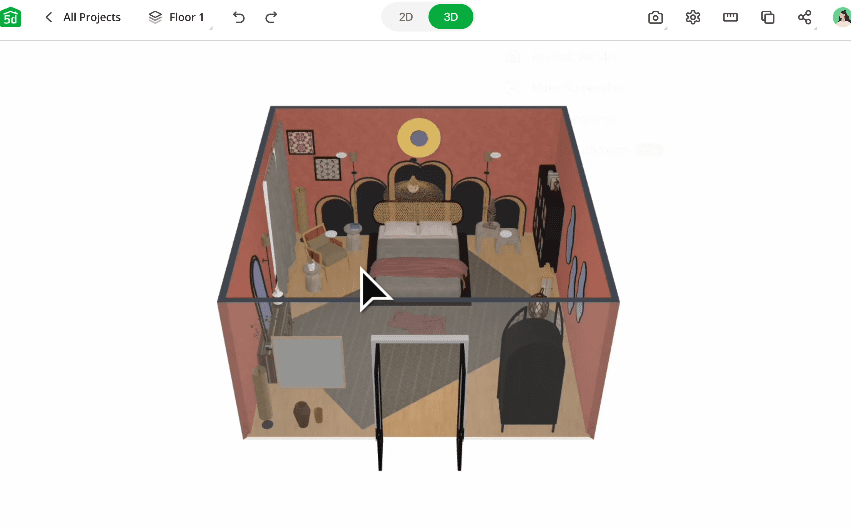
Effective layout planning is the foundation of any successful small apartment design. Before selecting furniture or décor, it is essential to establish a logical and efficient floor plan. Planner 5D offers grid-based design tools that help users define walls, create open floor concepts, and experiment with structural adjustments. In small apartments, even minor layout shifts can dramatically improve functionality.
Open concept layouts often work well in compact spaces. Removing unnecessary partitions creates better light distribution and smoother movement between zones. In Planner 5D, users can test whether eliminating a wall between the kitchen and living area improves flow or whether partial dividers provide better zoning. The ability to preview changes in three dimensions makes decision-making easier and more confident.
Zoning is crucial in small apartments. Instead of dividing rooms with walls, designers can use rugs, lighting variations, furniture placement, or color transitions to define areas. Planner 5D allows users to experiment with these subtle separations visually. For example, placing a sectional sofa strategically can separate the living room from a dining nook without blocking light. A bookshelf can act as a semi-open divider between a workspace and sleeping area.
Traffic flow must always remain unobstructed. Crowded layouts reduce comfort and make apartments feel smaller than they are. Planner 5D helps ensure that pathways are clear by showing real-scale proportions. Users can test door swings, measure clearance around tables, and adjust spacing between furniture pieces to maintain ease of movement.
Another smart strategy is vertical space utilization. Many small apartments have unused wall height that can accommodate shelving, cabinets, or lofted sleeping areas. In Planner 5D, users can add wall-mounted storage systems and experiment with ceiling-height cabinetry. This approach reduces floor clutter while increasing storage capacity.
Flexible layouts are especially valuable for modern urban living. Furniture that can be rearranged easily allows residents to adapt their space for entertaining, working, or relaxing. Planner 5D supports experimentation with modular furniture configurations. Users can visualize foldable tables, movable partitions, and convertible sofas to see how the space transforms under different scenarios.
Ultimately, maximizing space in small apartments is less about square footage and more about intelligent layout decisions. With Planner 5D’s visualization tools, users gain clarity and confidence in their design choices, ensuring that every square foot serves a purpose.
Multifunctional Furniture and Built-In Storage Solutions
In small apartments, furniture must work harder. Multifunctional pieces reduce clutter while increasing usability. Planner 5D allows users to explore furniture options that combine practicality with aesthetics, helping them design spaces that are both stylish and efficient.
Sofa beds are a classic solution for studio apartments. During the day, they provide comfortable seating, and at night, they transform into sleeping areas. In Planner 5D, users can position sofa beds and analyze how much clearance is needed when extended. This ensures that the room remains functional even during conversion.
Murphy beds are another excellent space-saving solution. These foldable wall beds allow the bedroom area to function as a workspace or living room during the day. Planner 5D helps users test placement and determine whether additional cabinetry can be integrated around the bed unit for extra storage.
Dining tables with foldable leaves or drop-down mechanisms offer flexibility in compact kitchens. Planner 5D enables users to simulate both extended and folded configurations, ensuring that the space remains adaptable. Similarly, nesting tables provide occasional surface space without permanently occupying valuable floor area.
Built-in storage is essential in small apartments. Custom cabinetry maximizes every corner, from under-bed drawers to floor-to-ceiling wardrobes. Planner 5D’s design features allow users to create custom storage units tailored to specific dimensions. This precision eliminates wasted gaps and enhances organization.
Underutilized areas, such as beneath staircases or above door frames, can also serve as storage zones. Planner 5D encourages creative exploration of these possibilities by enabling detailed structural modeling. By visualizing hidden compartments and integrated shelving, users can transform overlooked spaces into practical assets.
Minimalist design principles complement multifunctional furniture. Fewer but more versatile pieces create a cleaner and more spacious feel. Planner 5D’s catalog helps users select streamlined furniture that fits the aesthetic without overcrowding the layout.
Through thoughtful selection of multifunctional furniture and integrated storage solutions, small apartments can achieve remarkable efficiency. Planner 5D simplifies the process by allowing users to test ideas digitally before implementation, ensuring that each piece contributes meaningfully to the overall design.
Using Color, Light, and Texture to Create Visual Expansion
Visual perception plays a powerful role in how spacious an apartment feels. Even without increasing square footage, strategic use of color, light, and texture can dramatically transform the atmosphere. Planner 5D provides tools to experiment with these elements in realistic renderings.
Light colors such as soft whites, pale grays, and gentle pastels reflect natural light and make walls appear farther apart. In Planner 5D, users can test various paint shades and instantly see how they affect the ambiance. Dark accent walls may add depth, but excessive dark tones can shrink perception, so balance is key.
Mirrors are another effective visual trick. Strategically placed mirrors reflect light and create the illusion of additional space. Planner 5D allows users to position mirrors opposite windows or along narrow hallways to evaluate their impact.
Layered lighting enhances dimension. Ceiling lights provide overall illumination, while floor lamps, wall sconces, and under-cabinet lighting add depth. Planner 5D’s lighting simulation feature enables users to experiment with brightness levels and fixture placements. Warm lighting creates coziness, while cooler tones provide a modern, airy feel.
Flooring continuity also influences spatial perception. Using the same flooring material throughout the apartment creates visual flow and reduces fragmentation. Planner 5D makes it easy to apply consistent textures across rooms, helping users visualize seamless transitions.
Texture adds character without crowding the space. Soft fabrics, subtle wood grains, and minimalistic patterns introduce warmth while maintaining openness. In Planner 5D, users can experiment with material finishes to ensure harmony between surfaces.
Windows should remain unobstructed whenever possible. Heavy curtains can block light, whereas sheer fabrics allow brightness to filter through. Planner 5D enables users to test various window treatments and observe how they affect the overall brightness of the space.
By carefully combining color, light, and texture, small apartments can feel significantly larger and more inviting. Planner 5D empowers users to test these visual strategies before making physical changes, ensuring optimal design decisions.
Creating Personalized and Functional Small Apartment Interiors
While efficiency is essential, personalization gives a small apartment character and warmth. Planner 5D allows users to customize décor, experiment with design themes, and create interiors that reflect individual style while maintaining functionality.
Design themes such as Scandinavian, modern minimalist, industrial, or contemporary can be tested easily. Planner 5D’s visualization tools enable users to mix textures, colors, and furniture styles to achieve a cohesive look. Personal touches such as artwork, plants, and decorative accents can be positioned thoughtfully without overwhelming the space.
Greenery adds life and freshness to compact interiors. Even small potted plants or vertical garden installations can enhance the atmosphere. Planner 5D allows users to experiment with plant placement to ensure balance and avoid clutter.
Functional décor is especially valuable in small apartments. Wall-mounted organizers, stylish storage baskets, and decorative hooks combine beauty with practicality. Planner 5D helps users evaluate how these elements integrate into the overall design.
Work-from-home areas require careful integration into small living spaces. Planner 5D enables users to design compact desk setups, floating shelves, and ergonomic layouts without sacrificing living comfort. By visualizing proportions and spacing, users can ensure that productivity zones remain organized and efficient.
Personalized lighting fixtures, unique artwork arrangements, and carefully selected textiles contribute to the apartment’s identity. Planner 5D supports experimentation with these details, allowing users to refine aesthetics while preserving spaciousness.